Import your rates and suppliers
Upload a supplier rate sheet and RoundPlan reads it, proposes the entries and prices, and gives you a review screen before anything is saved to your library.
You have years of your own material. The green fee list a resort sends before each season, the room rates a hotel quotes for next summer, restaurant menus, activity prices and your own descriptions of the courses and suppliers you sell most. Most of it is sitting in PDFs and documents on your computer, and moving to new software used to mean typing all of it in again.
RoundPlan can now read those documents for you. It uses AI for one specific part of the import: reading the PDF or pasted text and working out what is inside it. The AI proposes the suppliers, names, locations, rates, room types, board bases, menus and other details it finds. You then check the result before anything reaches your library.
That first step is the difficult one. Supplier contracts rarely follow the same format, and a rate sheet from one resort can look completely different from the next. AI makes it possible to read those different layouts without asking you to rearrange the document first. After that reading step, RoundPlan uses fixed rules to validate, match and save the information.
Upload the contract, or paste the text
You will find an Import prices button next to Add in the courses, hotels, restaurants and activities libraries, and on the page of every entry in them. Choose a PDF or paste the text directly. You can also give RoundPlan some context, for example "Algarve, Portugal", to help the AI understand what it is reading and identify the suppliers mentioned in the document.
RoundPlan sends the document to the AI, which reads it and proposes a list of entries and prices. A dense contract can take up to a minute. If you paste a long document, RoundPlan reads it in parts. Once that is done, RoundPlan checks the proposed prices, labels and currency before showing you the result.
You get back a list of entries ready to review.
Nothing is saved until you have checked it
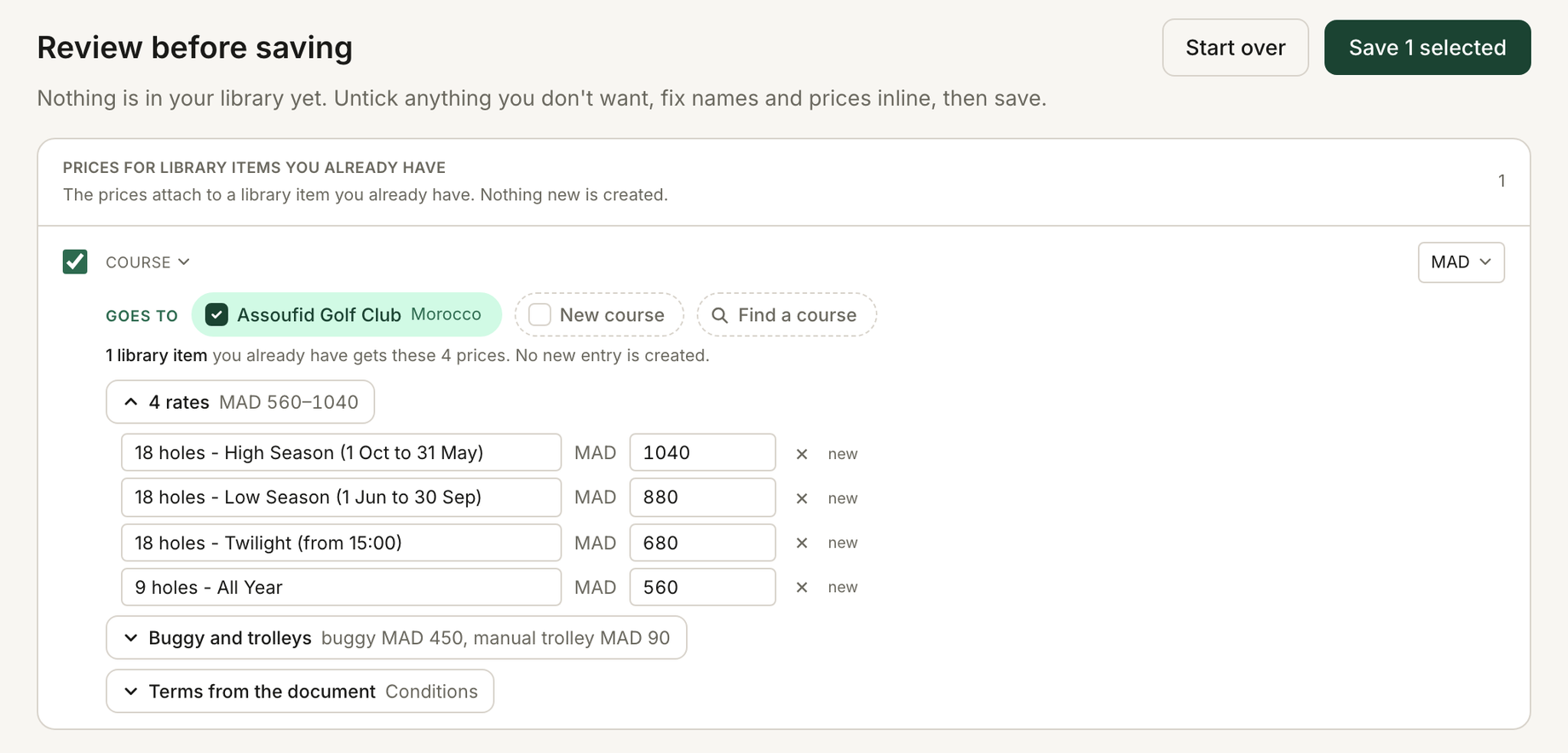
Every import stops at a review screen. Each row shows what RoundPlan found in the document, what it will become in your library and the prices attached to it. You can edit the prices there, name anything new, and untick what you do not want to save.
The AI also returns a confidence score for what it has read, so RoundPlan can mark a row when the model is unsure about it. If two courses in the database could be the one the document means, RoundPlan does not pick one for you. The row goes to review and asks you to choose. When a shorter name can only mean one course, RoundPlan ticks it for you, and one click removes it.
One document can price several courses
A resort might send a single rate sheet covering two or three golf courses, with different prices by season or by the number of rounds the group plays. The AI can read those documents too and propose which courses each offer applies to.
Those course names appear as chips on the review screen. You can remove one, add a course the AI missed or search the database for the correct match. If you remove every course, the row becomes a new course in your own library instead.
You do not have to split a supplier's document into separate files before importing it. You can give RoundPlan the rate sheet in the format the resort sent it and sort out the final matches on the review screen.
Next season's sheet goes onto the supplier you already have
When a course or hotel sends you next season's rates, you can import the new sheet into the entry you already use. Start from that course or hotel page and the import lands on it.
The AI reads the new document, but it does not decide how those rates merge with what you already have. Fixed rules in the database do that part. RoundPlan lists every price that differs from the one you have, and you decide line by line: use the imported price, keep yours, or keep both. RoundPlan never renames a label you already have, and new ones go in beside it.
The same process works for your courses, hotels, restaurants and activities.
It reads golf documents
Golf contracts have their own way of presenting prices, and the AI import step extracts the details that matter for a golf trip. A course entry carries seasonal rates, prices by number of rounds, twilight and nine-hole rates, and whether a buggy or trolley is included or charged separately.
Hotels come through differently. For hotels it proposes room types and nightly rates, with board bases such as breakfast or half board. Restaurants come through with menu prices per person, activities with their own options.
Green fee lists often show both a public price and the net rate offered to your business. When both are in the document, the net rate is the one that imports.
The original contract stays with the entry
After a PDF import, RoundPlan keeps the exact file it read and attaches it to every course, hotel, restaurant and activity the import touched. The contract sits under Documents, next to the prices, so if someone asks six months later what a particular green fee included, you can check the original document without searching through old emails and folders.
RoundPlan saves the conditions in the document as well: what the fee includes, who can book it and how long it is valid. They go under Terms on the same entry, where you can edit them.
The file is private to your business. Nothing you import changes the shared course database, and no other tour operator sees your rates.
Import is in beta
AI reads most contracts well, but it can make mistakes, so check every price and destination before saving. If a document does not import properly, email support@roundplan.io and we will help you with it or import it for you.
