Split payments for group trips
Split a group payment between travellers, give each person their own payment link and see who has paid and what is still due.
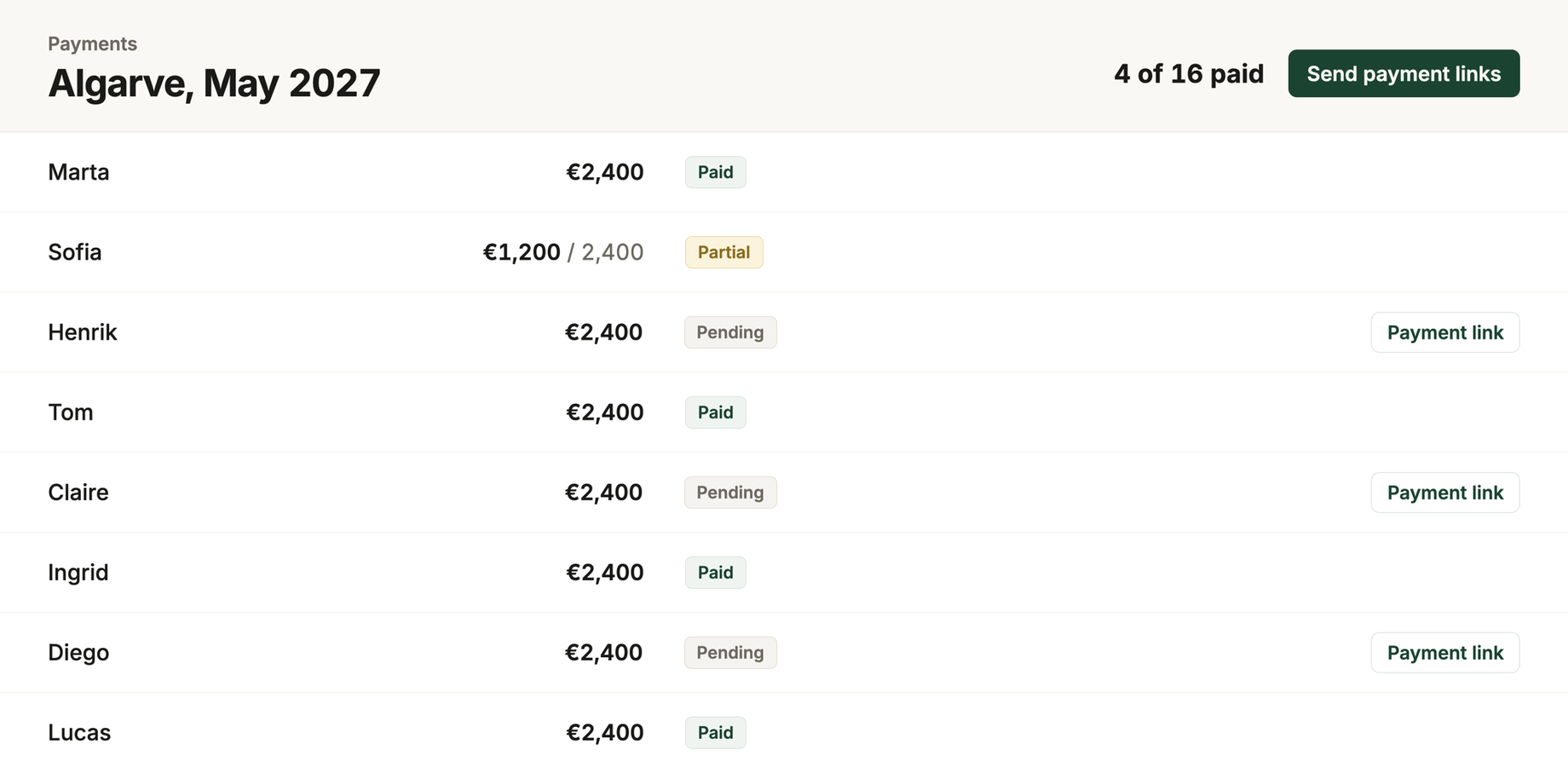
A group of sixteen books a week in the Algarve. The deposit is due in ten days. Four want to pay their own share, two are covering their partners, one sends the wrong amount by bank transfer, and two ask whether they can pay by card. There is one deposit to collect, but several different payments to keep track of.
The money you are expecting
Every trip has a Payments tab where you add the money you expect to collect: a deposit, balance, full payment or an additional payment. Each one carries an amount, a due date and how much of it has arrived.
A draft payment is visible only to your business. You can lay out the whole schedule, move the dates around and change your mind, and none of it reaches the client. Confirm it and it becomes visible on the client's trip page and gets its own payment link.
One share each, one link each
Split a payment across the travellers on the trip and each person gets their own share and their own link. Open an individual payment link and the traveller sees their first name, what the payment is for and their own amount.
The shares stay together under one heading that shows the group total and how many people have paid. Change the description or due date on the heading and every share updates with it.
What your client opens
Each confirmed payment still due appears on the client's trip page, and when you collect online it carries a Pay now button. The payment page carries your logo and business name, along with the trip, what the payment is for and the amount due. Your costs and your margins are never on it.
The trip page shows the full split to the group. Each traveller's individual payment link opens only their own share.
If the trip has a client currency, the page also shows the amount in that currency. It still makes clear which currency the card will actually be charged in. A traveller reading in kroner can see what will actually be charged in euros before paying.
Paying by card
Connect your Stripe account and confirmed payments can be paid by card through their payment link. The money goes straight into your own Stripe account. RoundPlan never holds the funds or takes a cut. Stripe's normal processing fees still apply.
Each link only asks for the amount still outstanding. If 500 has already arrived by bank transfer against a 2,000 deposit, the page asks for the remaining 1,500. When the card goes through, RoundPlan marks the payment as paid and records the date.
You can also record a payment by hand. A bank transfer you mark as collected does not need Stripe. The step by step guide covers connecting the account and sending the first link.
What comes back to you
When a card payment arrives, you get an email showing the trip, who paid and which payments are still outstanding. You get no email for a payment you marked as paid by hand, because you already knew.
For card payments, the amount received and payment date come from Stripe and are read only in RoundPlan. You can still edit the total, due date, description and status. Refunds are handled in Stripe; once refunded, RoundPlan reopens the outstanding amount and the same link can collect what remains.
Before the deposit is due, open the trip and the split shows how many of the sixteen have paid and exactly which shares are still outstanding.
